11 Best Free PDF Tools You Can Use Without Uploading Your Files
Here's an uncomfortable question: when you compress a PDF with a typical "free online PDF tool," where does your file actually go?
Answer: it gets uploaded to someone else's server, processed there, and (if you're lucky) deleted after an hour. If you're lucky.
That's fine for a restaurant menu. It's not fine for a signed contract, a payslip, a medical record, or a client proposal. Yet almost every popular online PDF tool works exactly this way — upload, process in the cloud, download.
What "no upload" actually means (and why it's possible)
A few years ago, this wasn't possible — browsers were too slow. Today, JavaScript libraries like pdf-lib can do real PDF processing locally at native speed. The tool page loads once, and after that you could literally disconnect from Wi-Fi and keep working.
That gives you three things no upload-based tool can offer:
- Privacy — signed contracts, IDs, payslips and medical documents never touch a third-party server.
- Speed — no upload/download round trip. A 50 MB file is processed as fast as your own machine can run.
- No file limits — no "free users are limited to 2 tasks per hour" paywalls tied to server costs, because there are no server costs.

Below are the 11 PDF tools I use, all free, all running locally in your browser.
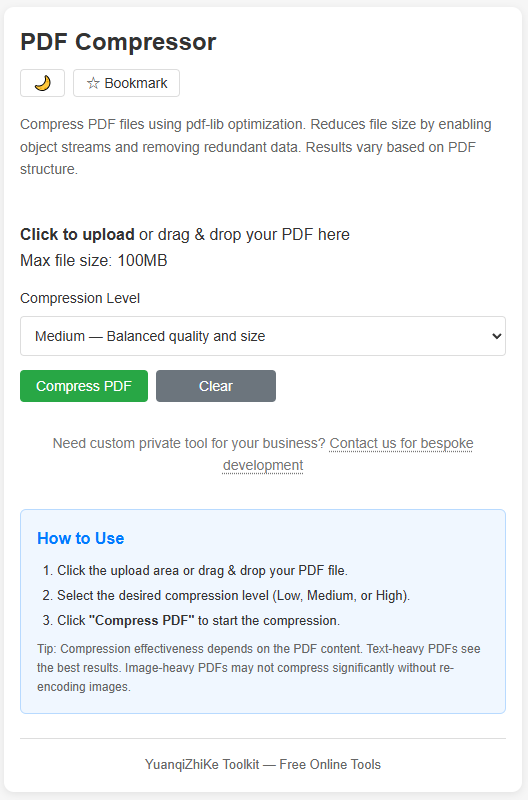
1. PDF Compressor — shrink large files before emailing
The classic problem: a 40 MB scanned PDF that your email provider refuses to send. The PDF Compressor rewrites the file's internal structure (enabling object streams and cleaning up redundancy) to cut file size — without re-encoding or touching your content.
Best for: email attachments, upload limits on job portals and government forms.
2. PDF Split & Merge — the two operations everyone needs
Merge three scanned pages into one document, or pull one page out of an 80-page contract. PDF Split & Merge does both directions: extract every page separately, pick a page range, or combine multiple PDFs into one.
Best for: assembling application documents, splitting oversized scans, extracting single pages to share.

3. PDF Form Filler — fill forms without printing
Still printing a PDF form, filling it by pen, and scanning it back? The PDF Form Filler detects fillable AcroForm fields automatically — you type, tab to the next field, done. Works entirely offline, which matters when the form is your tax return.

4. PDF Signature Tool — sign without a printer
Draw your signature on a trackpad or touchscreen, or upload a transparent PNG of your handwritten signature once — then place it on any PDF with the Signature Tool.

5. PDF to Word Converter — get editable text back
The PDF to Word Converter extracts the text layer from a PDF and rebuilds it as an editable document. Note the honest limitation: scanned image-only PDFs have no text layer to extract — for born-digital PDFs it works well.

6. PDF to Image Converter — pages as JPG/PNG
Need one page of a PDF as an image for a slide deck or a chat message? PDF to Image exports pages as high-quality JPG or PNG, with quality settings you control.

7. PDF Unlocker — open your own locked files
Password-protected PDF you own but can't edit anymore? The PDF Unlocker decrypts files locally — you enter the correct password, and the restriction is lifted. The password check happens on your device.
Use it on files you own — removing protection from other people's documents may violate their terms.

8. PDF Watermark Tool — protect drafts
Shipping a draft proposal or sample chapter? The Watermark Tool stamps custom text across every page — you control font size, opacity, rotation angle and position, with a live preview.

9. PDF Page Rotator — fix sideways scans
Scanners love to produce pages rotated 90°. Page Rotator fixes individual pages or whole ranges, in 90° steps.

10. PDF Metadata Viewer — see what your file says about you
PDFs carry invisible metadata: author name, software, creation history, sometimes more. The Metadata Viewer shows it and lets you edit it before you share the file.

11. PDF Page Counter — the 10-second answer
How many pages is that? Drop files into the Page Counter and get instant counts, with batch support for multiple files at once.

Quick comparison
| Tool | Job | Typical use |
|---|---|---|
| Compressor | Shrink file size | Email attachments |
| Split & Merge | Reorganize pages | Assembling documents |
| Form Filler | Type into forms | Government / HR paperwork |
| Signature Tool | Sign documents | Contracts |
| To Word Converter | Extract editable text | Reusing content |
| To Image Converter | Pages as JPG/PNG | Slides & sharing |
| Unlocker | Remove known-password locks | Your own archives |
| Watermark Tool | Stamp text overlays | Drafts & samples |
| Page Rotator | Fix orientation | Scanned files |
| Metadata Viewer | Inspect / edit file info | Pre-send privacy check |
| Page Counter | Count pages | Print & submission limits |
FAQ
Are these tools really free?
Yes — there's no server bill to pay, so there's no paywall.
Do they work offline?
After the tool page has loaded, you can disconnect from the internet and keep working. The processing is local.
What about huge files?
The limit is your device's memory, not a server quota. Files that choke upload-based tools on slow connections process fine here.
Is my file really not uploaded?
Open your browser's developer tools, watch the Network tab while using any tool — you'll see no file being sent anywhere. That's the whole point.
Related reading: How to Compress a PDF Without Losing Quality (3 Free Ways)